
Paper trading lets you practice buying and selling stocks, options, or futures with simulated money inside a live market environment, so you can test a strategy without risking a single real dollar. It is the closest thing to a dry run before you commit actual capital. Many brokerages and charting platforms now build the simulator directly into their normal trading interface, which means you can start practicing today at zero cost.
You have probably seen this play out before: a new trader opens a live account, buys a stock on a hunch, watches it drop, and panics into a sell. That trader skipped a step most experienced traders never skip themselves.
In this guide, our education team will walk you through exactly how to paper trade using three of the most popular platforms: TradingView, Webull, and thinkorswim. By the end, you will know how to set up a simulator, what to track while you practice, and how to tell when you are genuinely ready to switch to real money.
What Is Paper Trading?
Bottom Line: Paper trading builds platform familiarity and lets you test a strategy risk-free, but it cannot fully replicate the psychological pressure of trading with real money. Set a clear practice window, track results honestly, and expect some drop-off in performance when you switch to a live account.
Paper trading, sometimes called virtual trading or simulated trading, lets you place orders using fake money that moves through a live or slightly delayed market feed. Prices, charts, and order execution behave the same way they would in a funded account. Only the money is not real.
Think of it like a flight simulator for pilots. The instruments respond exactly as they would in a real cockpit, but if you make a mistake, nobody gets hurt. A paper trading simulator works the same way for traders: you get real market feedback without real financial consequences.
Key Concept: The market does not respond to what you understand in theory. It responds to what you actually do. Paper trading is one of the only ways to build the habit of executing a plan before your own money is on the line.
How Do I Start Paper Trading?
To start paper trading, pick a platform that offers a free simulator, create an account, switch into paper trading mode, and set a simulated balance that matches reality. From there, place trades exactly as you would with real money and track every result.
Here is the process we teach our members when they are working through how to paper trade online for the first time:
- Step 1: Choose a platform that matches the market you actually want to trade, whether that is stocks, options, or futures.
- Step 2: Create a free account. Every platform we cover here offers a paper trading app or built-in simulator at no cost.
- Step 3: Switch into paper trading mode before placing any order. This is usually a simple toggle or a separate account tab.
- Step 4: Set a realistic starting balance. Do not practice with $1,000,000 in fake money. Match the balance to what you would actually deposit.
- Step 5: Write a simple trading plan covering entry rules, exit rules, and position size before your first trade.
- Step 6: Place your first simulated trade and log it immediately, before you know the outcome.
The goal is not just clicking buttons. It is building the same decision-making process you will use later with real capital.
How Do You Paper Trade on TradingView, Webull, and Thinkorswim?
Each platform handles simulated trading a little differently. Here is how we set up each one, plus a quick comparison to help you pick.
TradingView
If you are wondering how to paper trade on TradingView, open any chart, then open the Trading Panel at the bottom of the screen and select Paper Trading from the broker list. TradingView gives you a virtual balance (commonly $100,000 by default, which you can reset), lets you place market, limit, and stop orders, and tracks open positions and P&L in real time. It is a strong choice for traders who live in charts and want to test technical setups quickly.
Webull
Webull's simulator sits inside the same app as your live account. Open the app, switch to Paper Trading from the app's account or trade menu, and you get a separate simulated balance running on real-time or slightly delayed prices. This is a good fit if you eventually plan to trade live on the same platform, since the order screens look identical.
thinkorswim
thinkorswim (from Charles Schwab) offers one of the more detailed simulators, called paperMoney. It includes full options chains, futures, and advanced order types, which makes it useful once you are past basic stock trades and want to practice more complex strategies. Contract specifications for the options and futures you will see there are published by the exchanges themselves, including Cboe and CME Group. Setup requires a Schwab login, but the account is free to open.
| Platform | Best For | Markets Simulated | Cost |
|---|---|---|---|
| TradingView | Chart-driven technical testing | Stocks, futures, forex, crypto | Free (basic tier) |
| Webull | Practicing on the same app you will trade live | Stocks, options | Free |
| thinkorswim | Options and futures strategy practice | Stocks, options, futures | Free with Schwab login |
Want expert trading insights delivered daily?
Join thousands of traders who rely on Traders Agency for market analysis and trade ideas.
Join Traders AgencyThe Emotional Gap Between Paper Trading and Live Trading
Paper trading teaches mechanics, but it cannot fully teach emotion, because there is no real financial pain when a trade goes against you. This is the single biggest reason traders perform well in a simulator and then struggle the moment they switch to a funded account.
In a simulator, a $500 loss is just a number on a screen. When that same $500 is rent money, your brain reacts differently, and that often shows up as hesitation, early exits, or revenge trading. The most common complaint we hear from traders making the jump sounds almost identical every time: "I was profitable on paper, then I lost money the second I went live."
We do not point this out to discourage you. We point it out so you build in a buffer for that emotional shift instead of getting blindsided by it.
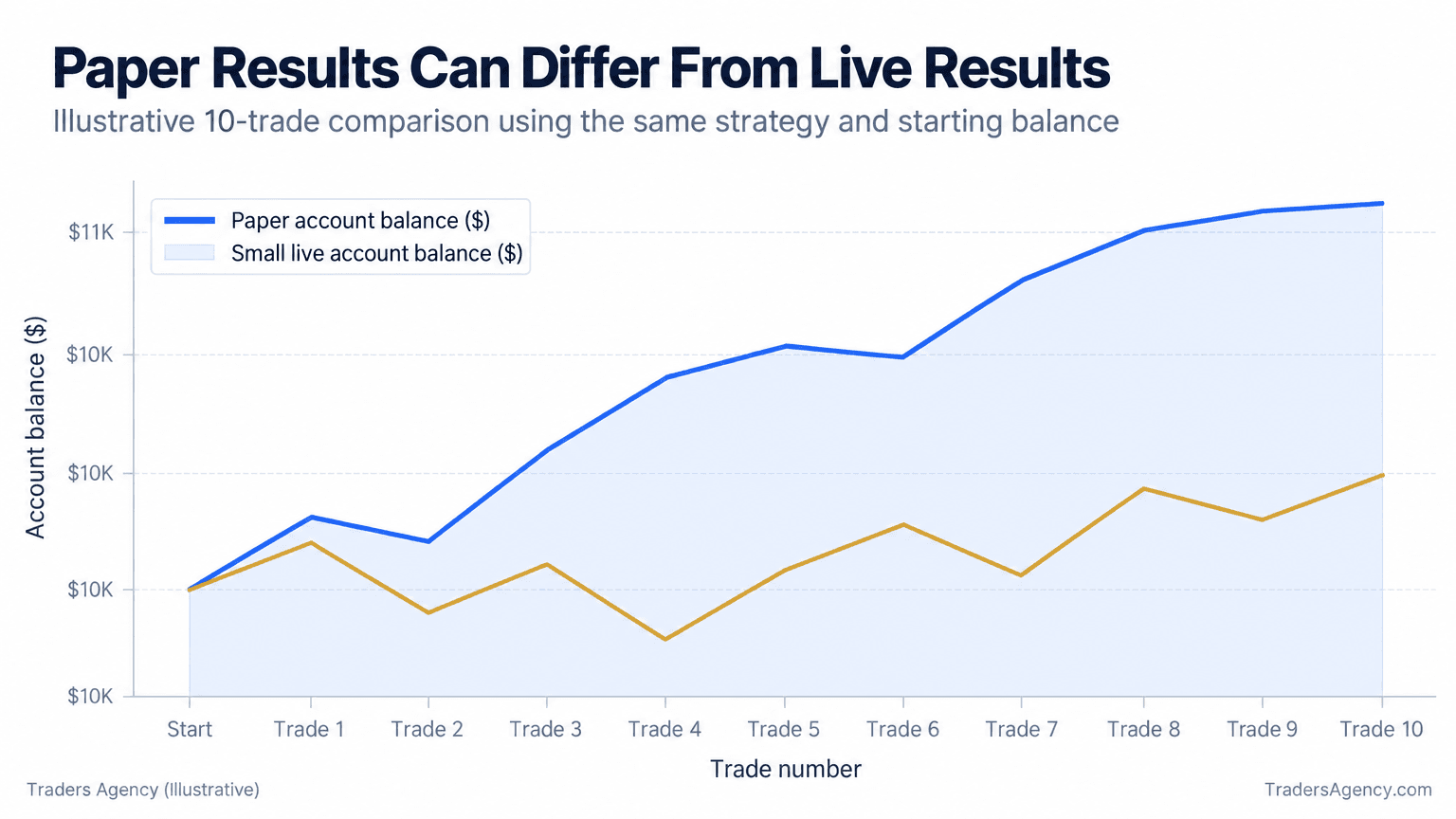
Watch Out: A simulator does not perfectly mirror live execution. Slippage, spreads, and partial fills can behave very differently once real money and real liquidity are involved. Expect your live results to start out slightly worse than your paper results.
What Should You Track While Paper Trading?
Track every trade's entry price, exit price, position size, reason for entry, and reason for exit, along with how closely you followed your own plan. That is what turns casual practice into a feedback loop you can actually improve from.
Keep a simple trading journal. A spreadsheet works fine. These are the fields we consider non-negotiable:
- Date and time of entry and exit
- Setup type, meaning the specific pattern or signal you traded
- Planned stop loss and target versus what actually happened
- Position size and the percentage of the account you risked
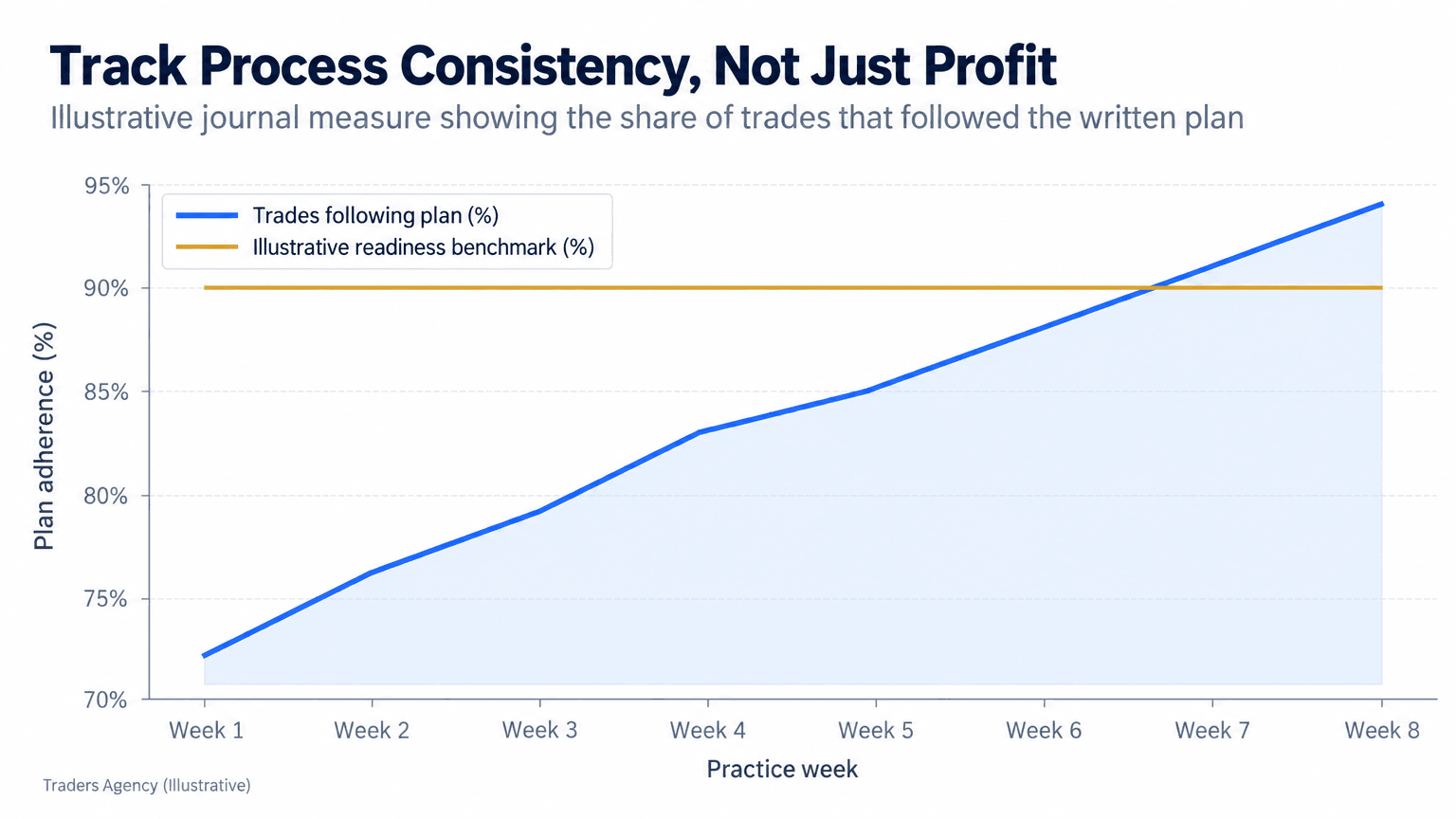
- Rule adherence: did you follow your plan exactly, or improvise?
That last field matters more than most beginners expect. A winning trade that broke your own rules is a warning sign, not a win.
When Should You Switch to Real Money?
Make the switch once you have traded one plan consistently in a simulator for several weeks, your rule adherence is high, and you have tested your position sizing at the same dollar amounts you intend to use live. Consistency matters far more than any single winning streak.
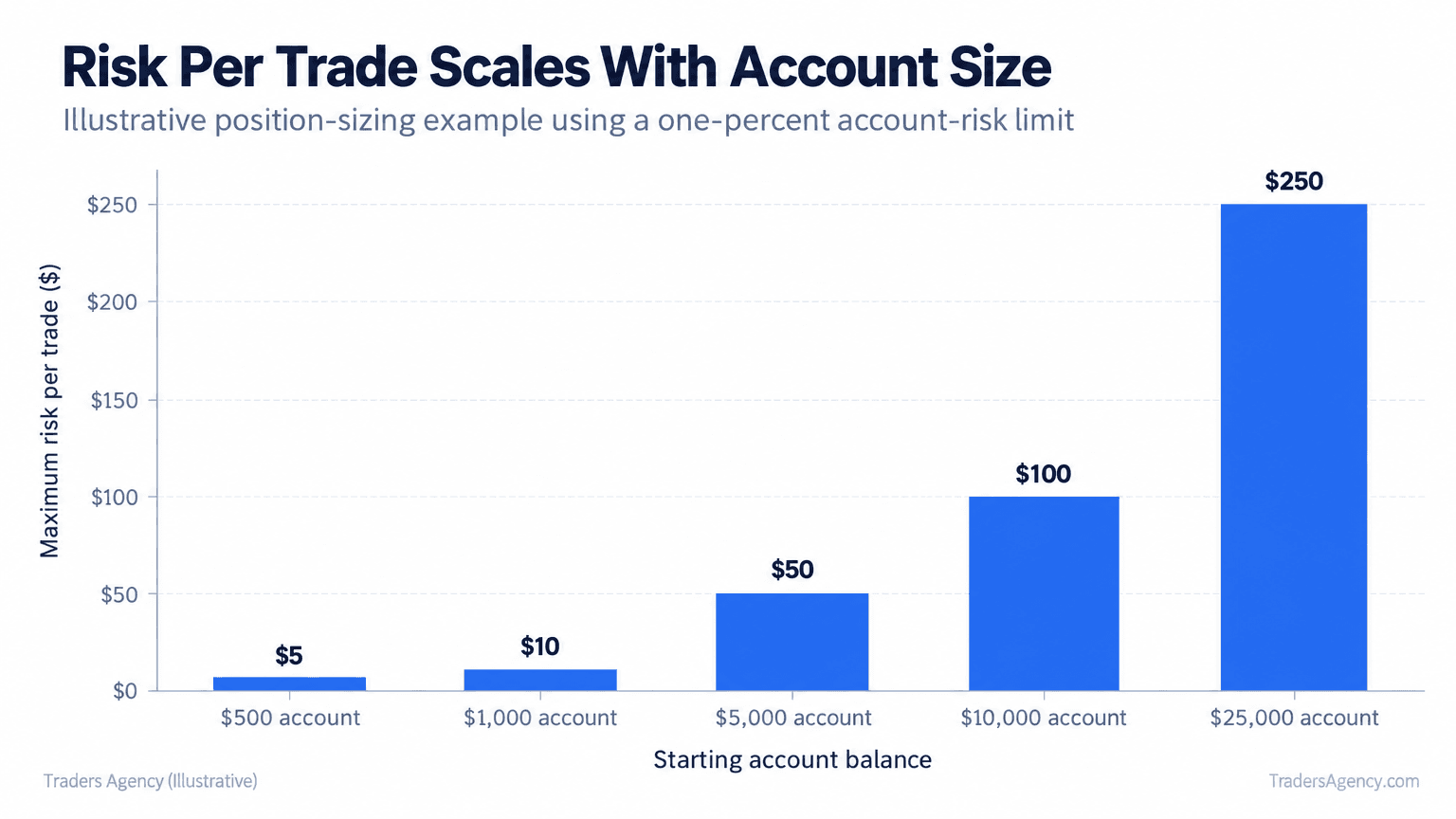
Before you go live, decide your maximum risk per trade as a percentage, not a dollar guess. The approach we teach is capping risk at roughly 1% of account value per trade. Here is what that looks like across account sizes:
| Account Size | Risk Limit | Maximum Dollar Risk per Trade |
|---|---|---|
| $500 | 1% | $5 |
| $1,000 | 1% | $10 |
| $5,000 | 1% | $50 |
| $10,000 | 1% | $100 |
Before you move real capital in, check for these signs of readiness:
- At least 20 to 30 logged trades following one consistent plan
- Rule adherence above roughly 90% across recent weeks
- Comfort with your position sizing math without needing a calculator mid-trade
- A written plan for what you do after a losing streak and after a winning streak
What Are Common Paper Trading Pitfalls to Avoid?
- Starting with an unrealistic balance. Practicing with $500,000 in fake money teaches you nothing about managing a $1,000 account.
- Overtrading because there is no real risk. If you are placing 40 trades a day in the simulator, you are testing your clicking speed, not your strategy.
- Skipping the journal. Without logged data, you cannot tell whether you are improving or just getting lucky.
- Assuming the simulator equals live execution. Fills, spreads, and slippage change once real liquidity is on the other side of your order.
- Never switching to live trading at all. Paper trading is a training tool, not a permanent home. At some point, small and controlled real-money exposure is what completes the education.
FAQs About How to Paper Trade
How do I start paper trading?
Pick a free platform such as TradingView, Webull, or thinkorswim, switch on simulator mode, set a realistic starting balance, and log every trade you place.
Is $100 enough to day trade?
For live day trading with real money, $100 is extremely limited because of pattern day trading requirements and basic position sizing math. You can review the rules and margin requirements that apply to day traders through the SEC. As a starting balance for a paper trading app, $100 is fine, but treat it as practice rather than a live day trading account.
Is paper trading good for beginners?
Generally, yes. It lets you learn platform mechanics and test a strategy without financial risk. The one limitation is that it cannot fully replicate the emotional pressure of live trading, so plan for a small step down in performance when you go live.
Can I paper trade for free?
Yes. TradingView, Webull, and thinkorswim all let you paper trade free, with no subscription required for the basic simulator features.
Want expert trading insights delivered daily?
Join thousands of traders who rely on Traders Agency for market analysis and trade ideas.
Join Traders AgencyDISCLAIMER: Traders Agency does not offer financial advice. The information provided is for educational purposes only and should not be considered financial advice. Traders Agency is not responsible for any financial losses or consequences resulting from the use of the information provided. Trading carries inherent risks and may not be suitable for all individuals. You are advised to conduct your own research and seek personalized advice before making any investment decisions, recognizing the potential risks and rewards involved.
See more from Traders Agency on Google
Make us a preferred source and our market analysis will appear more prominently in your Google Search, Top Stories, and AI results.
Add to Preferred Sources