
You're watching a stock you like, but you can't sit at your screen all day waiting for it to hit your target price. By the time you check again, it's already moved past the level you wanted, and the trade you planned is gone. In this guide, we'll show you how to set up three kinds of alerts, price, volume, and technical indicator, how the major platforms handle notifications differently, and how to avoid the mistakes that cause most beginners to either miss trades or get buried in useless pings.
What Are Stock Price Alerts and How Do They Work?
Bottom Line: Stock price alerts, along with volume and technical indicator alerts, let traders track setups without staring at the screen all day, but they only flag that a condition was met, not whether the trade still makes sense. Treat alerts as an information tool and still check the broader chart, position sizing, and stop-loss rules before acting on any notification.
Stock price alerts are automated notifications triggered when a stock's price, trading volume, or a technical indicator crosses a threshold you define ahead of time. The platform monitors the market on your behalf and pushes a message to your phone, email, or browser the moment the condition is met.
Here's how it works in plain terms. You tell the platform "notify me if AAPL crosses $230." The platform's servers continuously compare the live price feed against your rule. The instant the price ticks above $230, the system fires a notification through whatever channel you chose, whether that's a push notification, an email, or an in-app banner.
This matters because markets move fast and unpredictably. A stock can sit flat for three hours and then jump 2% in five minutes on a news headline. Alerts let you step away from the screen without losing track of the setups you actually care about.
Key Concept: A price alert is a standing instruction you give your platform in advance. It watches the market so you don't have to, and it notifies you the moment your condition is met.
How Do You Get Price Alerts?
You get price alerts by setting a trigger condition on a trading platform, broker app, or finance website, then choosing how you want to be notified (push, email, or in-app). Most major brokers and charting tools offer this feature for free.
Nearly every brokerage app built in the last decade has some version of this built in. If you're using Fidelity, the alert tool is reached from the stock's research page. If you prefer a free charting tool, TradingView and Yahoo Finance are two of the most commonly used options, and both offer free tiers with basic price-cross notifications.
We teach our members that the general process is the same across almost every platform:
- Search for the ticker symbol inside the app.
- Find the "Alert" or "Notify Me" button, usually near the price chart.
- Choose your condition (price above, price below, percentage change, volume spike, or indicator trigger).
- Pick your delivery method (push, email, or in-app).
- Save the alert and confirm it appears in your active alert list.
How Do You Set Up a Custom Stock Price Alert?
A custom price alert fires when a stock crosses a specific dollar level you choose, either moving up through resistance or down through support. This is the most basic and most useful type of alert for beginners, and it's where we recommend every new trader start.
Let's walk through a real setup. Say a stock is trading at $96 and you've noticed it tends to stall at resistance near $100. You want to know the moment it breaks above that level, because a clean break above a level like that can signal buyers have taken control.
Step-by-Step Setup
- Step 1: Open the chart. Pull up the stock's chart or quote page on your platform.
- Step 2: Find the alert icon. Tap or click the alert bell icon, most apps use a bell symbol near the price.
- Step 3: Select the alert type. Choose "Price" as the alert type.
- Step 4: Set the trigger. Enter $100 as the trigger level and choose "crosses above."
- Step 5: Choose delivery. Push notification is the fastest choice for time-sensitive setups.
- Step 6: Save it. The alert now appears in your active alerts list.
Once the price ticks from $96 up through $100, the system treats that as a price-cross event and sends your notification within seconds.
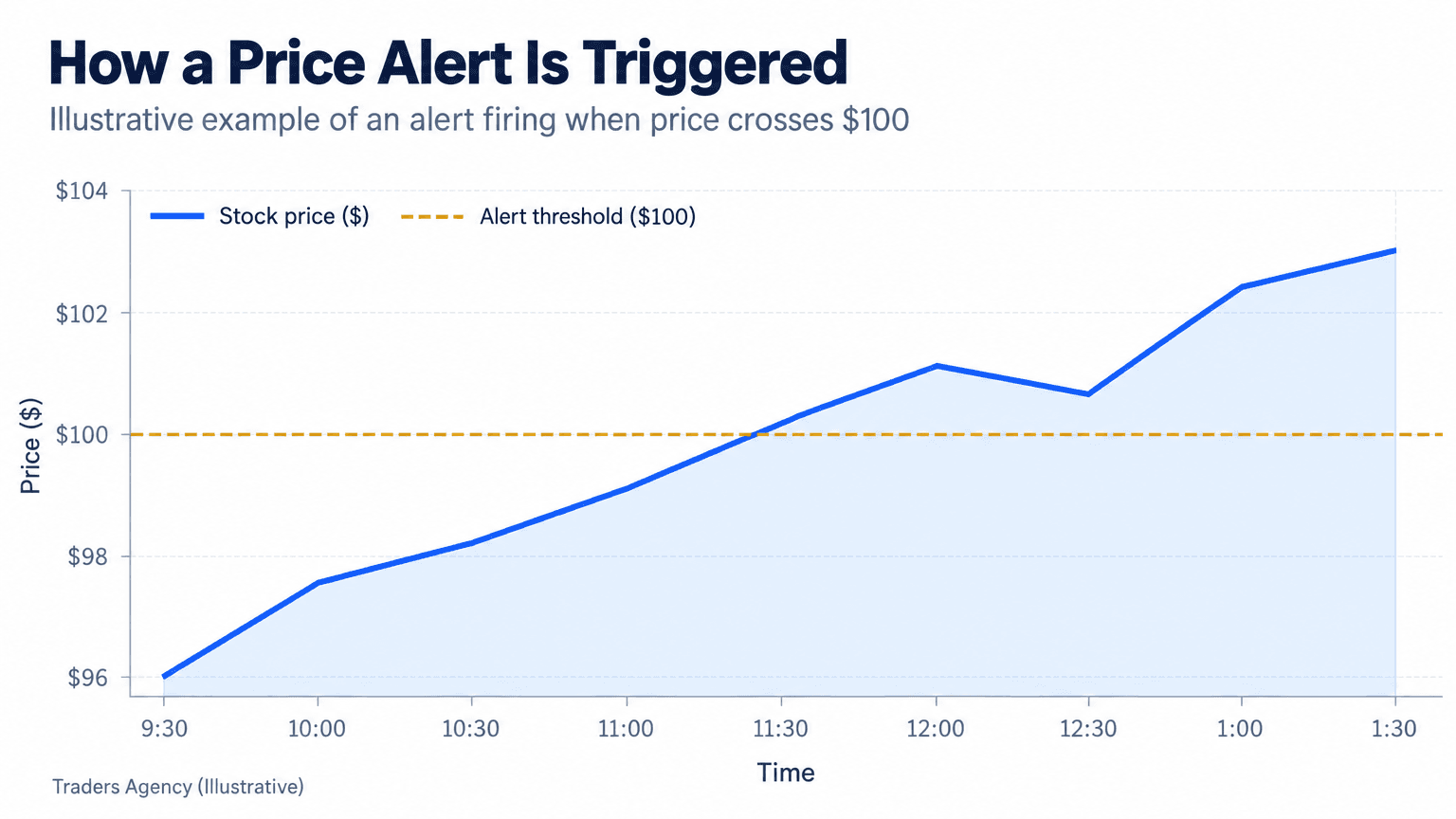
Many platforms also let you turn on after-hours alerts, which monitor the pre-market and post-market sessions. This matters if you're watching a stock around an earnings release, since big moves often happen before the regular session opens.
If you want alerts firing reliably while markets are open, push notifications are the better choice over email, which can be delayed by a few minutes depending on your provider.
How Do You Set Up a Volume Spike Alert?
A volume spike alert notifies you when a stock's trading volume jumps well above its normal average, which often signals that something, news, institutional buying, or a breakout, is happening in real time. Volume confirms whether a price move has real conviction behind it.
Here's how it works in practice:
| Scenario | Volume by Midday | What It Suggests |
|---|---|---|
| Normal Day | 1.2 million shares | Typical, no unusual interest |
| Spike Day | 3 million shares | Unusual interest entering the stock |
Setting It Up
- Open the alert menu and select "Volume" instead of "Price."
- Set the trigger as a multiple of average volume (for example, "2x the 10-day average").
- Or set a flat number, like "alert me above 2.5 million shares."
- Choose your delivery method and save.
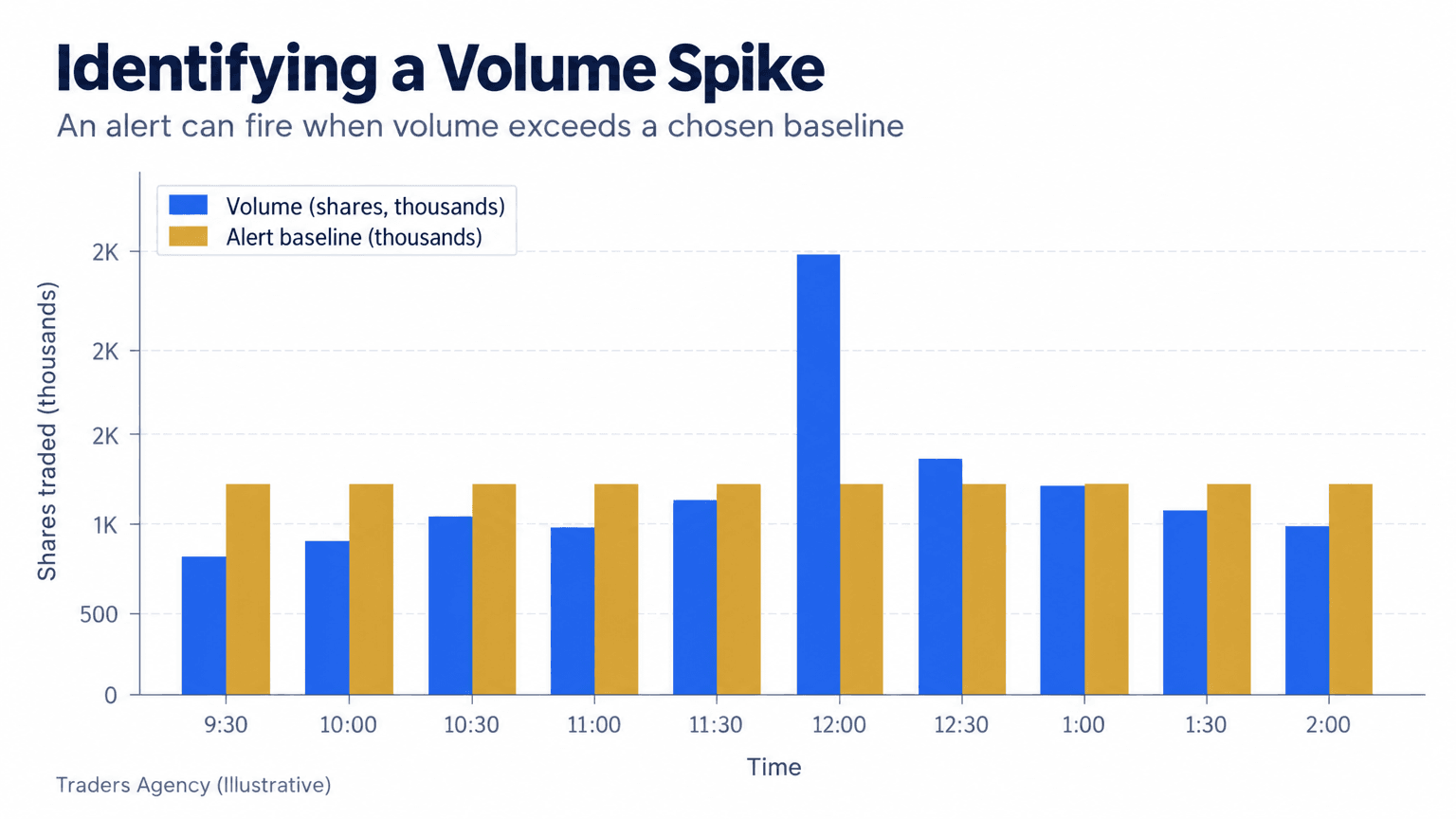
We tell our members that volume alerts work best as a confirmation tool, not a standalone signal. A price breaking out on low volume is far less reliable than the same breakout on elevated volume.
Want expert trading insights delivered daily?
Join thousands of traders who rely on Traders Agency for market analysis and trade ideas.
Join Traders AgencyHow Do You Set Up a Technical Indicator Alert?
A technical indicator alert triggers when a calculated metric, like the Relative Strength Index (RSI) or a moving average crossover, reaches a condition you've defined, rather than tracking raw price or volume directly. These alerts let you automate signals from the indicators you already use in your analysis.
The RSI is a momentum indicator that ranges from 0 to 100. Our approach is to treat a reading above 70 as potentially overbought and a reading below 30 as potentially oversold.
Example Setup
- Step 1: Add the indicator. Open the indicator panel on your chart and add RSI (14-period).
- Step 2: Open alert settings. Choose "Indicator" as the alert type.
- Step 3: Set the condition. Select RSI and set the condition to "crosses above 70" or "crosses below 30."
- Step 4: Save it. Choose your notification method and save.
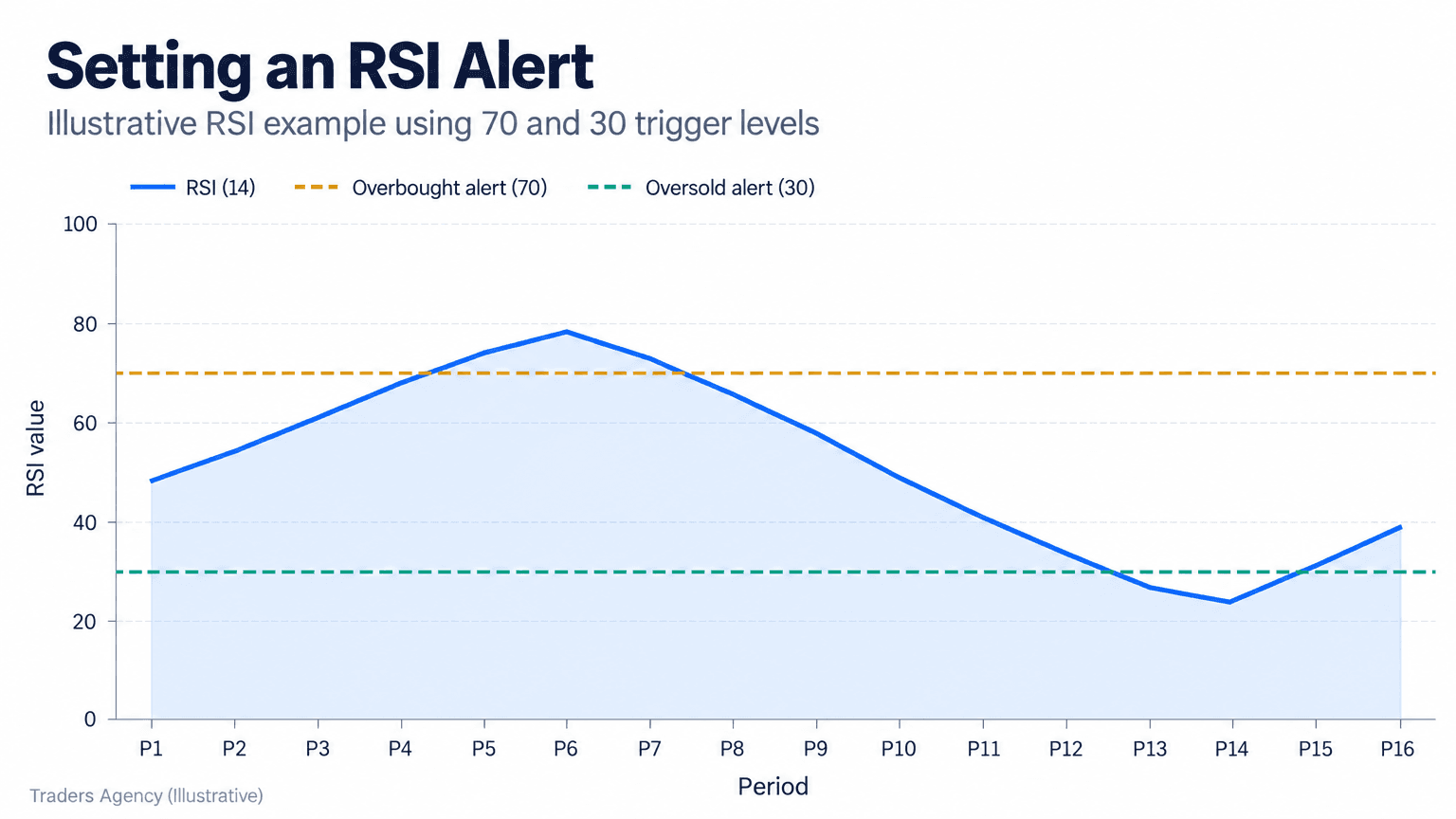
Moving average crossovers work similarly. You can set an alert for when the 50-day moving average crosses above the 200-day moving average, a pattern often called a "golden cross" that some traders watch as a longer-term trend signal.
How Do Push, Email, and In-App Alerts Differ?
Push notifications, email alerts, and in-app alerts differ mainly in speed and where you'll see them. Push notifications arrive almost instantly on your phone's lock screen, email alerts may lag by a few minutes, and in-app alerts only show up when you open the platform.
For time-sensitive setups like an intraday breakout, push notifications are the better fit. If you're setting up an alert on an iPhone, most broker apps will ask for notification permission the first time you create an alert, which you'll need to approve in your phone's settings.
Email works better for longer-term alerts where a few minutes of delay doesn't matter, such as a stock approaching a 52-week high you've been tracking for weeks. In-app alerts are useful as a backup log, letting you review everything that triggered even if you missed the notification itself.
Comparing Alert Features Across Platforms
Not every platform handles alerts the same way, and the differences matter once you're running multiple alerts across several stocks.
| Platform | Strengths | Limitations |
|---|---|---|
| TradingView | Free price alerts, strong technical indicator alert support across hundreds of built-in studies | Limited number of active alerts on the free tier |
| thinkorswim | Detailed conditional alerts, including multi-condition setups (price and volume together) | Steeper learning curve for beginners |
| Interactive Brokers (IBKR) | Strong volume and order-flow alerts, tight integration with trade execution | Alert management screen is less beginner-friendly |
If you're already using Fidelity, the alert setup is handled through the stock's research page rather than a dedicated alerts tab, which trips up some new users at first. If you'd rather avoid downloading another app entirely, you can also get basic price tracking by searching the ticker directly in Google and using the "track" bell icon that appears on the search results card.
Common Alert Setup Mistakes and How to Fix Them
Most beginners don't fail at setting up alerts, they fail at managing them once they have more than a handful active. Here are the issues we see most often with our members.
- Setting too many alerts at once. Ten alerts firing the same morning causes you to start ignoring all of them, a problem known as alert fatigue. Fix it by limiting yourself to your top five to eight watchlist names.
- Forgetting to approve push notification permissions. If your phone blocks the app's notifications at the OS level, you'll never see the alert even though the platform sent it.
- Using only price alerts and ignoring volume. A price alert without a volume check can fire on a low-conviction move that reverses minutes later.
- Not organizing alerts by watchlist. Grouping alerts by sector or strategy (earnings plays, breakout watches, long-term holds) makes it much easier to know why an alert fired when it does.
- Setting alerts too close to the current price. This causes immediate, often meaningless triggers on normal daily noise rather than a real move.
Watch Out: Alert fatigue is one of the fastest ways to undo the benefit of alerts in the first place. If you're ignoring most of your notifications, you have too many active at once.
When Should You Use Stock Price Alerts?
Alerts work best when you already have a specific plan in mind and you simply need to be notified when the market reaches your trigger point. They're less useful if you're using them as a substitute for having a plan at all.
We recommend using price alerts for clear support and resistance breaks, volume alerts to confirm those breaks have real participation, and technical indicator alerts for momentum extremes like RSI readings above 70 or below 30. Combining at least two types on your highest-conviction watchlist names gives you more context than relying on price alone.
Risk Warning: Avoid setting alerts and then trading purely on the notification without checking the broader chart first. An alert tells you a condition was met, it doesn't tell you whether the trade still makes sense given everything else happening in the market that day.
Treat alerts as an information tool, not a trading signal by themselves, and keep your position sizing and stop-loss rules consistent regardless of how a trade idea reached you.
Want expert trading insights delivered daily?
Join thousands of traders who rely on Traders Agency for market analysis and trade ideas.
Join Traders AgencyDISCLAIMER: Traders Agency does not offer financial advice. The information provided is for educational purposes only and should not be considered financial advice. Traders Agency is not responsible for any financial losses or consequences resulting from the use of the information provided. Trading carries inherent risks and may not be suitable for all individuals. You are advised to conduct your own research and seek personalized advice before making any investment decisions, recognizing the potential risks and rewards involved.
See more from Traders Agency on Google
Make us a preferred source and our market analysis will appear more prominently in your Google Search, Top Stories, and AI results.
Add to Preferred Sources